November offer — 40% off for the first 100 doctors

23 sold · 77 of the 100 left Get it

Features

The Chamber’s Day, End to End

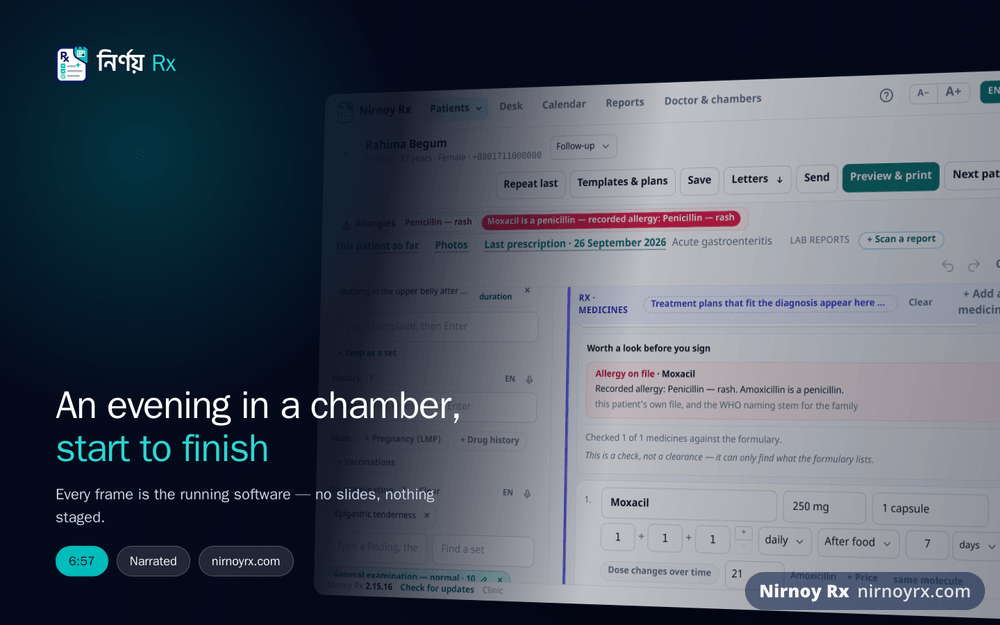
A serial before they walk in, a prescription while they sit, a fee on the way out, and the day’s reckoning at the end. The pictures are the real application.

AI scribe

Your Consultation, Written into the Prescription: You Only Check It

No typing while you see the patient. With the patient’s agreement, Nirnoy Rx’s AI scribe listens to the whole conversation between doctor and patient (in Bangla, English or both) and drafts every box of the prescription. You talk to the patient, not the keyboard; at the end you check each box, tick it, and print.

  1. With the patient’s agreement, press “Listen to the consultation”: the computer’s microphone, or your phone if it has none.
  2. Talk as you always do: Bangla, English or both. It hears the patient too.
  3. Stop, read what was heard and correct it if you like; see the price, then ask for the draft.
  4. Complaints, history, examination, diagnosis, tests, advice and follow-up, each box on its own, added when you tick it. BP, pulse and temperature go to their own boxes.
  5. Each medicine said goes on in one tap with its dose and days; a misheard name offers the register’s nearest names to pick. If no medicine was said, it suggests a treatment that allows for the patient’s allergies, current medicines, long-term illnesses, vaccines and family history. Nothing goes on until you approve it.
  • A number heard unclearly, or said in words, is never written in by itself; it is held back for you.
  • A moment without the internet loses nothing: it tries again, and marks the part with “Try again” if it must.
  • No recording and no transcript is kept; the patient’s name never goes to the AI; the consent is logged with the visit.
  • One press of Undo takes back everything the scribe added.

See the “AI scribe” tour in the demo What it costs

Prescriptions

Written the Way You Write

The pad is laid out the way the paper prints. Start typing a brand and the DGDA register offers it; put in a dose (1+0+1) and the days, and it works out the quantity.

  • Last visit’s prescription in one click
  • Your own templates, for what you write every day
  • Allergies sit as chips across the top, and a medicine that runs into one is flagged there in red

A walk through Nirnoy Rx — the prescription, inhalers and insulin, the patient’s phone, lab warnings, a child’s growth, photos, online serials and the registers

Watch it on its own page, with the narration written out →

Printing

Your Pad, Your Measurements

On a pre-printed pad, say how many millimetres to leave at the top. Without one it prints the whole sheet: your name, degrees, BMDC number and the chamber’s address.

  • An exact preview before it goes to the printer
  • One press sends it to the patient on WhatsApp, or as a text
  • A4 and A5
The print preview: the doctor’s name and BMDC number above, medicines and advice below

Prescribe from your phone

On the Ward, at Home or on the Way: The Prescription on Your Own Phone

Write the whole prescription on your own phone, paired with the chamber computer, sign it with your passcode, then send it to the patient or print it at the chamber.

  • Medicines from the DGDA register, your usual doses as chips; how often, when and for how long in a press
  • Serious warnings shown before it is signed; signing asks for the passcode again
  • Last prescription again, your own plans and sets, and dictation into each box
A prescription on the doctor’s phone: two medicines, the advice and the next visit

Medicines and advice

On the patient’s phone

Scan the Code: Medicines, Tests, Advice and Exercises, Bangla First

The QR code on the prescription opens the medicines large on the patient’s phone (morning, midday, night, before or after food), Bangla first. “Remind me” puts the times into the calendar or the alarm.

  • The prescription is not sent anywhere; the list travels inside the code
  • It reminds them of the next visit too
  • The link sent by WhatsApp or text opens the same page
The medicines on the patient’s phone in Bangla after scanning the QR code, marked as checked

The medicines, in Bangla

Lab results and safety

It Reads the Patient’s Own Reports

Write metformin for a patient whose creatinine is 2.6 and it says so in red as you write, naming the report it read. It never works out a dose; it only says a threshold has been crossed.

  • Allergies and interactions in the same panel
  • Trends: HbA1c coming down, creatinine creeping up, BP and weight, one small chart each
  • Reads the values off a photographed report, on your own computer, free
The safety panel: eGFR about 28; metformin should not be used below 30, with the report’s date

Children and pregnancy

Growth on the WHO Curves, Vaccines on the EPI Schedule

Weigh and measure a child and it reads the figures against the WHO curves as you type, and by how many SD. From the date of birth each EPI dose has a due date, even when the card is left at home.

  • A child’s dose by weight: you set the mg/kg, how often and the most in one dose; it shows the working, and the dose goes on the line only when you press Use
  • The weeks and the due date from the LMP, printed on the prescription
  • A late dose moves the next one on by itself
A child’s growth charts: weight, length and head circumference for age, the child’s points on the WHO lines

The desk

The Assistant’s Phone Is the Desk

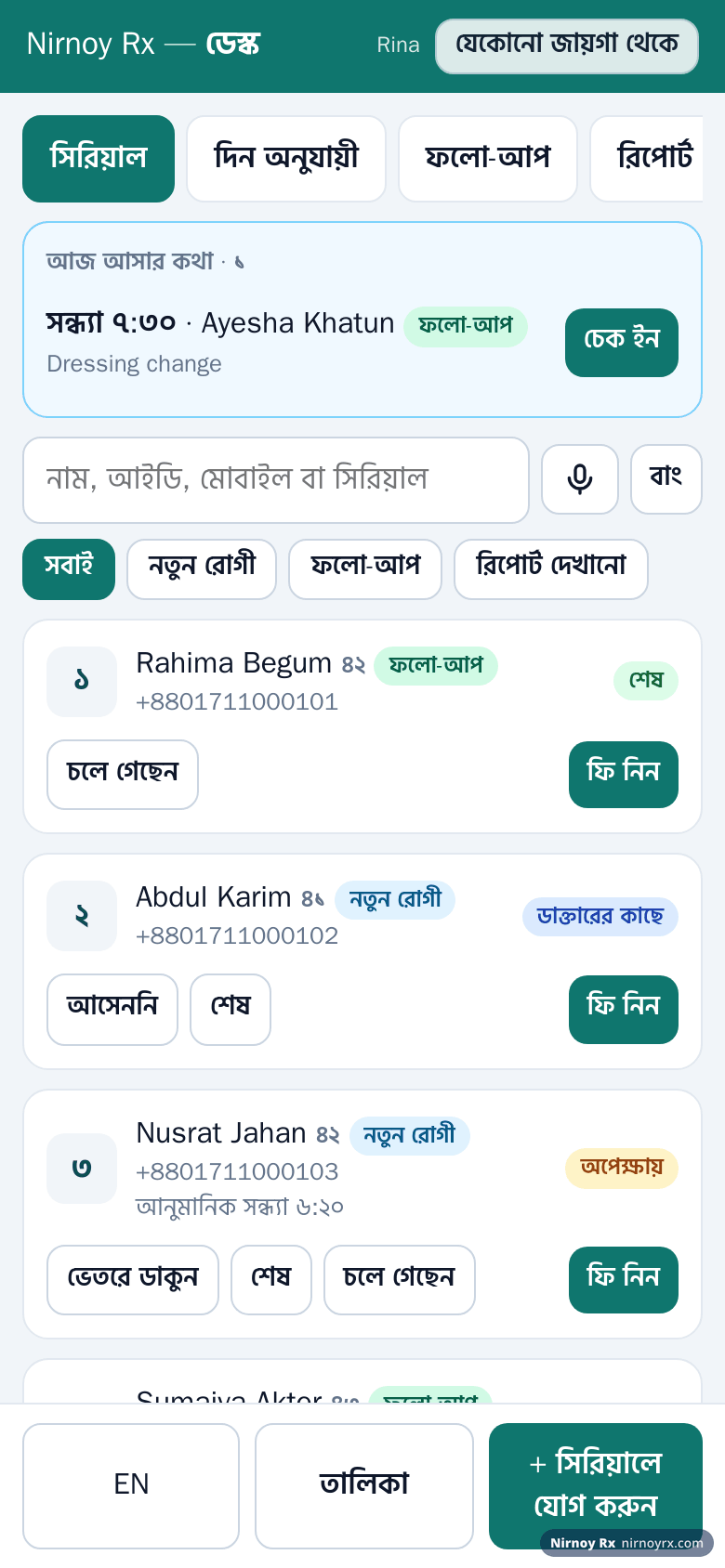
From their own phone the assistant gives serials, calls patients in, takes fees and scans reports. It works on the chamber’s Wi-Fi with no internet, and over mobile data too.

  • Prescriptions and patient files never reach the phone
  • A serials-only phone cannot reach the money
  • A lost phone is switched off in one click
The waiting list on the assistant’s phone, with each patient’s purpose and rough time

Online serials and deposits

A Real Serial from Home, with Its Time

The patient takes a serial from a link, today or a day ahead, and knows beforehand which number and roughly when. Real numbers are given even while your computer is off. A deposit by the bKash payment gateway, or sent manually with the transaction ID.

  • Nothing to type to set up: each chamber its own link, and one link for all your chambers where the patient picks the chamber
  • The patient’s own link shows their number and rough time, and moves when you run late
  • You set how many go online and how many are kept for walk-ins
Taking an online serial on the patient’s phone: the purpose, the day, and the number and rough time shown beforehand

And the rest

Everything Else, in Brief

The detail of each is under “More details”, and all of it in the guide.

Patient files

The mobile number is the patient

Too many patients share a name, so the mobile number is the identity. Type it and every earlier visit and medicine is there.

  • All of a patient’s old prescriptions in one window, one after another with the arrows: as a summary or the printed page, and the settings choose which opens first

Guide: bringing your practice in

Doses and interactions

An overdose is caught, with the arithmetic and the source

Every line’s dose is set against the Bangladesh National Formulary’s maximum, by route and age, with the sum and the source’s own words.

  • Such as “3 × 665 mg × 3 a day = 5.99 g a day; the maximum it gives is 4 g a day”; by route: mouth, vein, muscle

Reports from the centre

The patient need not travel to show you a report

From a diagnostic centre or hospital your Nirnoy Rx is linked to, the reports of tests you ordered come straight to you, once paid and with the patient’s consent, and file themselves under the patient.

  • Only the tests you ordered; the figures exactly as the centre approved them, with its own ranges; where the mobile, name, sex and age do not all agree, you match it

Guide: lab reports from a centre, in your own app

By speciality

Your department’s plans, and your department’s warnings

Treatment plans for each department, from the national guidelines first and international ones where there are none, with every advice line in Bangla too, and the department’s own warnings, each with its source.

  • The departments: heart, skin, children, chest and TB, liver, nerves and brain, pregnancy and women’s health, bones and joints, ear-nose-throat, eye, diabetes and thyroid, kidney, mental health and general medicine

Specialty charts

Spectacles, teeth, ENT, DMARD and bones, on the same pad

Spectacle prescriptions, tooth charts, the ENT examination, DMARD monitoring, orthopaedics and plasters, gynaecology, cardiology and exercises: each department switches on only what it needs, and it prints as a small, clear table.

  • Each has its own chip at the top of the pad and its own + on the printed page, in Bangla digits on a Bangla prescription

Guide: spectacles, teeth, DMARDs and other sections

Inhalers, insulin, injections, sprays

Each form written its own way

Puffs for an inhaler, units for insulin, IM, IV or SC for an injection, “in each nostril” for a nasal spray: pick the medicine and its form’s boxes and doses come with it.

  • “Rinse your mouth”, “shake before use”, “keep in the fridge”, offered by themselves, a press each to add

From your own pad

A picture of your pad, and the AI sets up the rest

Photograph your blank pad; the AI reads your name and degrees, the BMDC number, the chamber, the logo and the colour, and you tick what to keep.

  • If the pad has blanks for the name, age, sex, weight and date, each value prints into its blank

Certificates and referrals

Certificates without the handwriting

Sick leave, fit to resume, medical and fit-to-travel certificates, filled from the file, in Bangla or English with your BMDC number.

  • The name, age, guardian, the day of the examination and the diagnosis from the file; numbered, printed and kept on the file

Guide: medical certificates

Disease registers and recalls

Which diabetic has not had an HbA1c this year

Diabetes, hypertension, kidney disease, heart disease, thyroid, asthma and epilepsy each on its own list, with what each patient is overdue for, and a text to all of them in one press, cost shown first.

  • Every patient’s last BP, HbA1c and kidney figures; whose medicine is running out, who has not been back for three months

Guide: disease registers

Patient photos (optional)

Before and after, with the patient’s consent

Photos of a rash, a wound or a lesion on the patient’s file, two visits side by side. Nothing appears until you switch it on; every photo needs consent, and a private area is always covered.

  • Which part of the body, which side; side by side or under a slider, each with that day’s diagnosis and medicines

Guide: patient photos

The drug register

The DGDA register’s 38,202 products

The veterinary products left out, 37,425 human medicines, found by brand or by generic. Type “Napa” and Napa comes first, not naproxen.

  • Single molecules before combinations, tablets before syrups, because that is usually what a chamber needs

Serial times and the calendar

Every number with a rough time

From your opening time and the minutes you give each patient, every serial gets a rough time, such as “number 9, around 7:20 pm”. The line still moves by number; the calendar shows how full each day is.

  • You choose: the next number in order, as now, or a free time the patient picks; the time is only for when to leave home

Guide: serial times, the calendar and appointments

Fees and takings

Settling with the chamber at month end

Each fee is written down as it is taken: cash, bKash or card. A chamber’s share comes off by itself, so at month end what is yours and what is theirs is not a matter of opinion.

  • A new patient or a follow-up; by day, week, month or year

Guide: two chambers, one book

Backup

The whole practice, in one file

The patients, visits, prescriptions and takings in one file, on a pen drive or your own Google Drive. Nobody opens it without your recovery passphrase, us included.

  • Changing computers takes nothing more than that file

Guide: backing up and restoring · Security and privacy

The AI

Where it helps, and only there

The AI does not practise medicine here; it takes away typing: advice in plain Bangla for the patient, a long history shortened, a hard-to-read report page read. Every button shows its likely cost first.

  • An ordinary lab report is read on your own computer, free; the AI reads a hard page only when you ask

What the AI does · What it costs

Offline and licensing

The licence is checked on your own machine

The licence is a signed file, bound to your computer and checked offline, so no lost connection stops you mid-chamber with “could not verify your licence”.

  • Moving to a new computer moves the licence

Guide: how the licence works

Also

For Doctors in Training, and for Hands Kept Free

The postgraduate logbook

Training for FCPS, MD or MS: cases gather themselves from your prescriptions and procedures, without the patient’s name, phone or ID, for a spreadsheet or a printout your supervisor signs.

The AI scribe

With the patient’s agreement it listens and drafts the record; you check every box before it goes in, and medicines never go in by themselves.

The microphone switches itself off

When dictating, it switches the microphone off a few seconds after you stop speaking.

Questions

The Practical Details

Can I bring in my existing patients?
If you have an Excel or CSV file (names, mobiles, ages, addresses), yes. Old prescriptions on paper cannot be brought in, but you can keep them as notes on the patient’s file.
Can the prescription print in Bangla?
Yes. The patient’s name, the advice and the follow-up date print in Bangla. Medicine names stay as the DGDA register spells them, because that is the spelling the pharmacy looks for.
Can different chambers have different fees?
Yes. Each chamber has its own fee, its own hours, its own share arrangement, and even its own time zone.
What does lab report OCR do?
Photograph a report and it reads the values (a CBC, a creatinine, an HbA1c) into the visit, on your own computer, free. Every figure is read three times; one in doubt is marked beside the strip of page it came from and waits until you have checked it. Next time you set it beside the last report instead of hunting for the paper. It does not interpret the report; it only writes it down.
Can Nirnoy Rx write the prescription from the conversation between doctor and patient?
Yes, with the AI scribe. With the patient’s agreement it listens to the whole consultation (Bangla, English or both) and drafts the complaints, history, examination, diagnosis, tests, advice and follow-up; vitals go to their own boxes and each medicine said is added in one tap with its dose. Nothing reaches the pad until you have checked and ticked it.
Does the AI scribe prescribe by itself?
No. It shows the medicines that were said and you add each in one tap. If none was said, it offers a treatment to consider that allows for the patient’s allergies, current medicines, long-term illnesses, vaccines and family history. Nothing is added unless you approve it.
Is the recording of the consultation kept anywhere?
No. Neither the recording nor the transcript is kept, and the patient’s name is never sent to the AI. Only the fact that the patient agreed is logged with the visit.

Start Today

Try it free for 14 days: the whole thing, no card. If it does not suit you, delete it. Or buy it outright, if you would rather.