

The doctor’s app · Getting started
Installing Nirnoy Rx
Putting Nirnoy Rx on a Windows computer, and what it asks the first time it opens.
Nirnoy Rx installs on your own computer, so there is no website to log into. Once the file is downloaded it installs with no internet at all.
On Windows
- Download
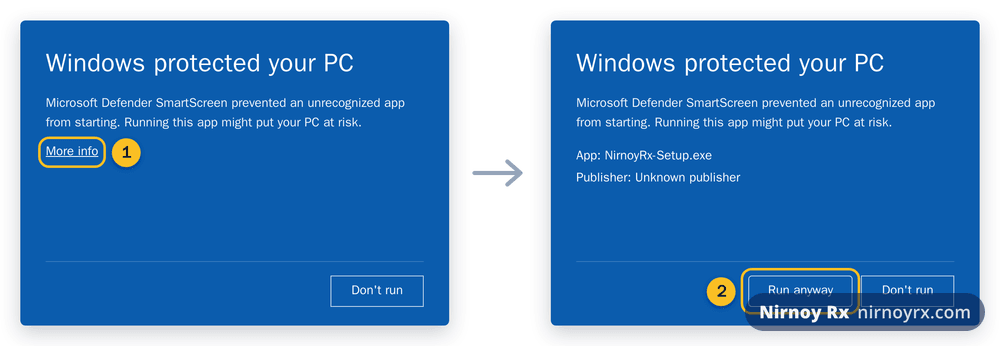
NirnoyRx-Setup.exefrom nirnoyrx.com. - Double-click it. If a blue screen says “Windows protected your PC”, there is nothing wrong. Click More info, then Run anyway.
- When it asks where to install, the default is right.
- When it finishes, the icon is on your desktop.
Checking the File Is Ours
Because Windows says the publisher is unknown, there should be a way to check rather than a request to trust. We publish a SHA-256 fingerprint for every installer. Open Command Prompt, run certutil -hashfile <the file name> SHA256, and if the long number it prints matches the one below exactly, the file is the one we built and not one character has changed. If a hospital IT department asks, this is what they want.
Published now: NirnoyRx-Setup-4.6.0.exe · 128 MB
SHA-256 5a10b450eada88fd94ecb78c5672b18a44fb238722577ea2c12d6c3f797bc4e8
The First Time It Opens
It asks for three things: a recovery passphrase, your name and degrees, and at least one chamber. The passphrase matters more than it looks: without it no backup can ever be opened, and that includes by us. Write it down, and keep it somewhere that is not the chamber.
Locking the Screen
A line across the top asks what should unlock this computer’s screen. There are three answers and all three are legitimate: a PIN, four to eight digits, quick between patients; your recovery passphrase, so there is nothing new to remember; or nothing, on a machine nobody else touches. It can be changed later under Doctor & chambers.
With a PIN, the lock opens the moment its last digit is typed, no Enter. With the passphrase, press Enter or Unlock when you have typed it.
What It Needs
| Thing | How much |
|---|---|
| Windows | 10 or 11, 64-bit |
| Disk | About 400 MB |
| Internet | Not to install; once to check the licence |
If this page did not get you there, write to support. Tell us where it stopped making sense and we will fix the page too.