

The doctor’s app · Day to day
Online Serials and Deposits
Patients booking from home, and taking a deposit, through the gateway, or sent by hand.
With online serials on, patients take a number themselves from a link. It is a real number in the real line you will call from this evening.
Switching It On
There is nothing to type. Nirnoy Rx makes the address from your name, such as relay.nirnoyrx.com/c/dr-farhana-islam-k7q2, and shows it read-only. No chamber is named in it.
- Go to Doctor & chambers → Phones & online → Online serials.
- Press Switch online serials on. The desk switches itself on too if it was off.
- Tick each chamber that takes serials online. Each has its own card: how many a day, how many are kept for walk-ins, how many minutes before opening booking closes, and the deposit.
- Set Serials can be taken this many days ahead and How serials are given on the chamber; the details are under “Serial times, the calendar and appointments”.
- Copy a link onto your Facebook page, your card, or into WhatsApp: each chamber’s own link, or one link for all your chambers.
One Link for All Your Chambers
With more than one chamber, give out one link for all your chambers. The patient first sees the chambers (address, days, hours and whether serials can be taken now), picks one, and books. No chamber is named in the link, so it never has to change. It works while your computer is off too. With one chamber, the link opens straight on it.
The Deposit, Two Ways
| Way | What the patient does | What you do |
|---|---|---|
| bKash gateway | Pays with bKash inside the booking. | Nothing: the serial confirms itself. |
| Sent by hand | Sends to your bKash number and types the transaction ID. | The desk matches the ID and presses confirm. |
How the Patient Knows When to Come
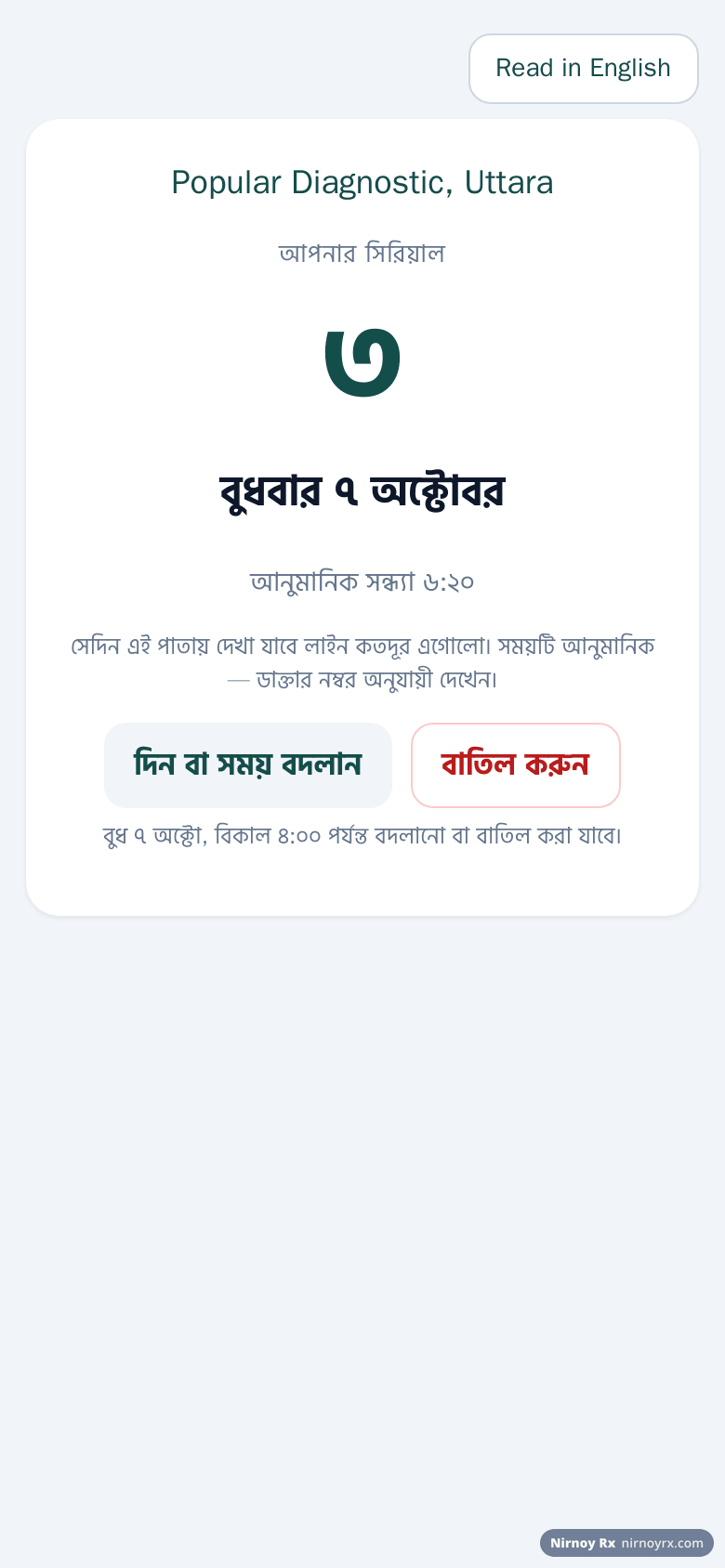
After booking, the patient gets a link of their own showing their number, how many are ahead, and roughly when they will be called, with half an hour of room. If you start late, that time updates itself.
The Serial Text Message
A serial text sent through the gateway goes in English, so the doctor’s name, the chamber’s full name, the serial and both times all fit one message (one message holds 160 letters in English and only 70 in Bangla). It ends with the patient’s own link: nirnoyrx.com/w/…, where the same news is in Bangla, and changes the moment the time does. For example:
If the names are very long, the chamber’s address goes first, then the end of a name; never the serial, the times or the link, and it always costs one message. The link is there when the relay is on, and stops working after two days. If the doctor’s name is written only in Bangla, the short Bangla message goes as before. A message sent from the assistant’s own phone stays in short Bangla as before.
When Your Computer Is Off
The pages are normally answered by your own computer. While it is on, it leaves nirnoyrx.com the free numbers for each day and their rough times, nothing about any patient. In the morning, with the computer off, patients take real serials from there, and an assistant’s phone joined “from anywhere” can give them too. When the computer comes on, it puts those in the line before anything else.
- What the patient types (name, mobile) is sealed as it arrives so only your computer can open it.
- One serial per mobile a day still holds.
- A deposit through the bKash gateway needs the computer on; a transaction ID sent by hand is kept for the desk to check later.
- If the computer was on without internet and gave the same number at its own desk, the later of the two moves to the next free number, and the desk is told whom to ring.
Leaving a Name While It Is Shut
If the computer has not been on for a week, there are no numbers left at nirnoyrx.com either. For that, you can switch this on: while the chamber is shut, a patient can leave a name and a mobile number instead of going away. The page says plainly that it is not a serial; those are issued by your computer. The names are held sealed for a week at most and arrive at the desk the moment the chamber opens, above the queue rather than in it.
- Go to Doctor & chambers → Phones & online → Online serials.
- With the relay running, tick Take a name while the chamber is shut below it.
- Next time you open the desk they are at the top; ring back, give the serial, then press × to clear it.
What the Patient Does on Their Phone
- They open the chamber’s link; it opens in Bangla, with English a tap away at the top. They choose why they are coming (new visit, follow-up, to show reports) and the day; each day shows how many are left.
- The page says beforehand “Your serial will be no. 5, around 6:40 pm”; or, where times are picked, they choose one of the free times.
- They type their name and mobile, and if they like the patient ID on their prescription, their age, sex and why they are coming. Booked from this phone before? Tapping their name fills it all in.
- If you ask for a deposit: with the gateway they pay in bKash there and then; sent by hand, they send it to your bKash number and type the transaction ID.
- Pressing Take a serial shows their serial number large, with the day and rough time, and See my place, their own link. Save as picture or Copy the details keeps the serial.
On their own link the patient sees the number being seen, how many are ahead of them and roughly when they will be called. If you start late, or patients take longer, the time moves by itself, and it says so when the doctor has not started yet.
The Waiting-Room Board
A page for the chamber’s television or anybody’s phone: the serial being seen, whether the evening is on time or late, how many are waiting and how many have been seen, and who is next, with no names. A box underneath lets anyone type the number the desk gave them and press Show to see their own place. The link is on the Desk screen.
If this page did not get you there, write to support. Tell us where it stopped making sense and we will fix the page too.