

The hospital and clinic · Outpatients
Outpatients (OPD): from booking to the doctor’s room
Doctors’ sittings and fees, serials at the desk, by phone and online, arrival and the visit’s bill, the call on the waiting room’s television, and the prescription in the doctor’s own Nirnoy Rx.
An outpatient goes one way: booking, arrival and payment, the call into the doctor’s room, then tests and medicines. Each step below, in order, with where it is done and by whom.
Set up once (the administrator)
- In Doctors give each doctor’s degrees and speciality, the Fee for a new patient and the Follow-up fee (with how many days a return to the same doctor counts as a follow-up — 30 to begin with), and their sittings: the room, the days and hours, plain serial numbers or picked times, how many numbers are kept for walk-ins, and when booking from outside closes.
- In Setup → Money & tax → When patients pay choose, for each outpatient service, paid before it or after it on the same visit. To begin with, a consultation, a procedure and a vaccine are paid first; paid first means the patient is not called in until the invoice is paid.
- In Setup → Places → Waiting-room screens add each television: which doctors it shows, its language and its voice. On the television open /staff/tv and pair it with the six-digit code.
- If wanted: the patient card first — an outpatient needs a card before being served; and payment in advance for online bookings, to the hospital’s own bKash or SSLCommerz account (Setup → Money & tax; see Paying online before a visit).
Booking
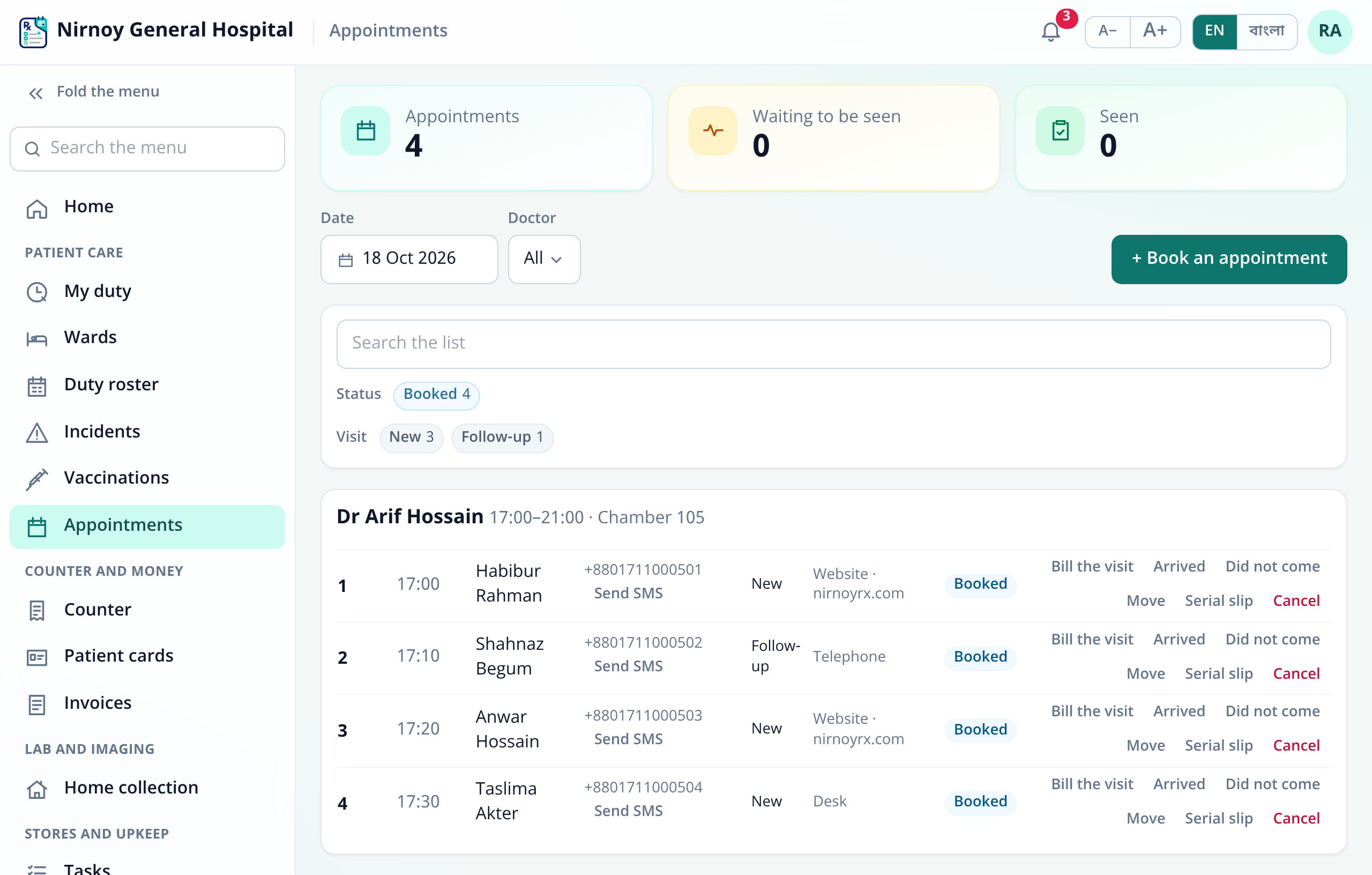
- At the desk or by phone: Appointments → Book an appointment. Scan the patient card and the name and mobile fill in; the desk may give the numbers kept for walk-ins.
- Online: from the hospital’s website, up to the time booking closes for each sitting. The list shows where each booking came from — the website, the telephone or the desk.
- On each row Send SMS texts the number and time to the patient’s mobile; Serial slip prints; Move and Cancel are there too. Texting needs an SMS package or the hospital’s own gateway (Text messages).
- Each doctor decides whether patients may cancel their appointment themselves, from the link they are given when they book, and until how many hours before the sitting.
Arrival and payment
- When the patient comes, the desk presses Arrived on the row; Did not come if they do not. The tiles at the top show the day’s appointments, how many are waiting to be seen, and how many have been seen.
- Bill the visit shows the fee by the doctor’s rules — new or follow-up — and makes the invoice with any discount and what is paid now. Money paid online in advance is set against this invoice.
- Money is taken at the Counter, in an open shift: cash, card, bKash or split. A panel member’s bill is split between the panel and the patient.
In the doctor’s room
- The doctor presses Call next from their own login or phone (the desk can too): the number shows on the waiting room’s television and is announced — numbers only on the television, never a name; the name is on the doctor’s panel. Where the hospital takes the fee first, a patient still to pay keeps their number and is called once paid. Call again and Not here are there, with how many have arrived and are waiting.
- The prescription is written in the doctor’s own Nirnoy Rx, linked to the hospital with a one-time link from Doctors → Link their Nirnoy Rx. While the hospital takes the fee at its counter, the doctor’s app takes none for that chamber; the doctor chooses whether the hospital sees that chamber’s totals.
- With the patient’s agreement, the AI scribe can listen and draft the record; the doctor checks every box before it goes in (The AI scribe).
After the consultation
- Tests and imaging at the counter, as at a diagnostic centre: part paid at registration, the rest at delivery; the report is not handed over while money is due (The counter and invoices).
- Medicines at the pharmacy counter.
- A manager may allow a service before payment, with a reason; where the hospital runs the government EPI programme, the national schedule’s doses are free.
You can try all of this in the demo hospital: pick the reception or a doctor on its role picker.
If this page did not get you there, write to support — tell us where it stopped making sense and we will fix the page too.