

The hospital and clinic · Day to day
Report sender: reports from your own lab software to the doctor’s app
Reports made in the hospital’s own laboratory software — a PDF or a scan — checked, paid and agreed, sent to the doctor’s Nirnoy Rx; branches, withdrawing a wrong one, and ninety days kept.
Where the hospital’s laboratory runs on its own software, reports can still reach the doctor’s Nirnoy Rx — without changing that software. The report goes page by page, exactly as it prints; nothing goes until a person has checked the patient, the tests and the doctor.
How reports come in
- Print the report from your laboratory software to Microsoft Print to PDF and save it in the watched folder. Within a minute it is in Send reports, and the file moves into the folder’s Taken by Nirnoy.
- Or drop a PDF, JPEG or PNG on Send reports from any computer, or press Choose files. The same file is never taken twice.
Checking and sending
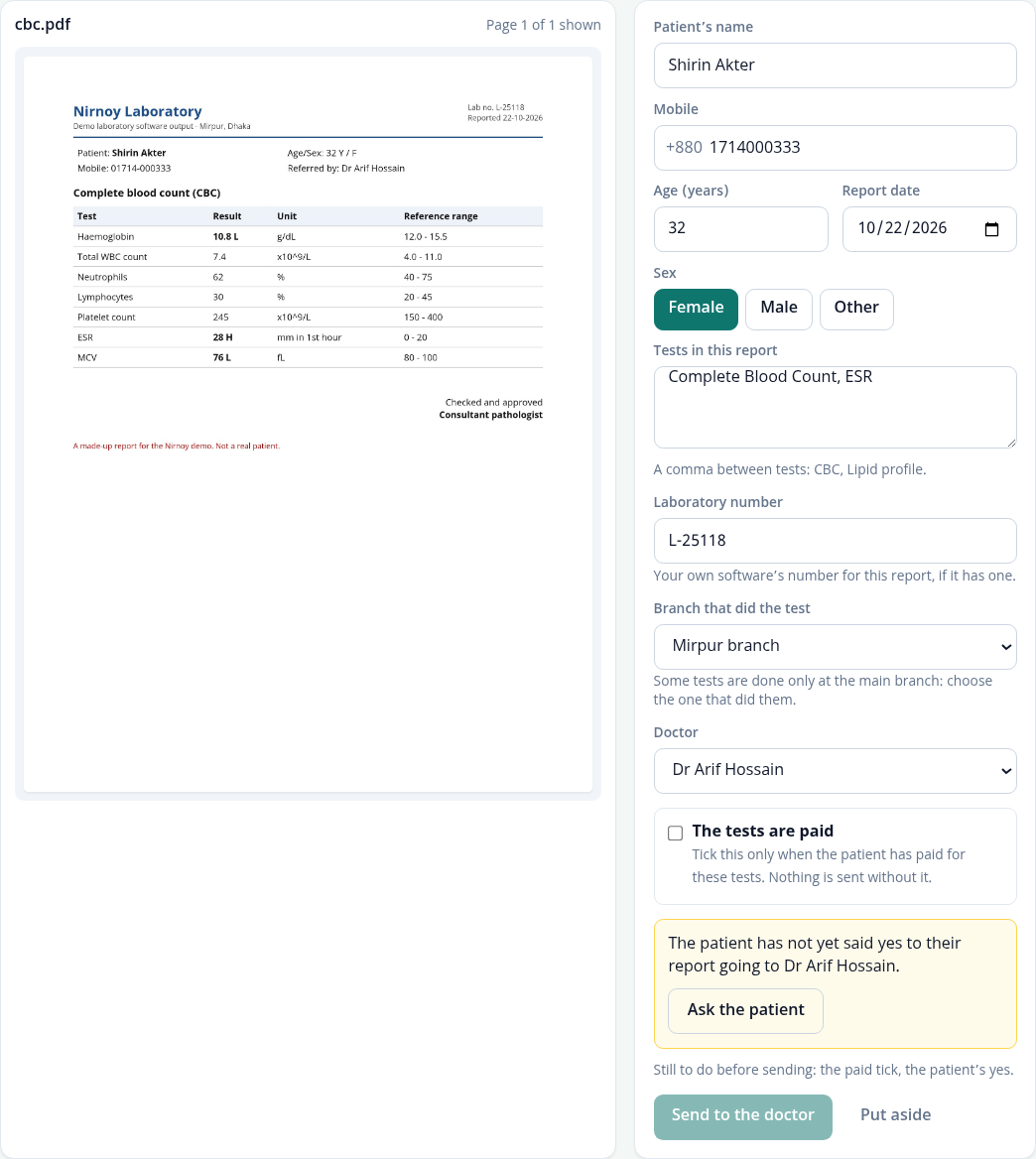
- Choose a report under Waiting. Its pages are on the left, the boxes on the right.
- For a PDF made by software, the patient’s name, age, sex, mobile, lab number, date, referring doctor and tests are filled in free from its words, marked in blue. Check each against the page.
- For a scan or a photo, type them, or press See what reading it costs and have the AI read it — from the AI credits. Its first two pages go to the AI service, the patient’s name included.
- Choose the doctor — only those whose Nirnoy Rx is linked are listed.
- Tick The tests are paid only when the patient has paid for these tests.
- The first time, press Ask the patient for their consent — the same statement and slip as at the counter. Once per patient and doctor, for every branch.
- Press Send to the doctor. It reaches the doctor’s app the next time that app is online; it waits in the relay mailbox even while this computer is off.
Branches
With more than one branch, the administrator names them in Sender settings. Choose This computer is at on each computer and reports dropped there carry that branch; it can be changed on each report. Where some tests are done only at the main branch, choose the branch that did them — the doctor sees the branch in their app.
Withdrawing a wrong report
- Under Sent, press Withdraw on the report’s row and write why.
- If it has not reached the doctor’s app it never will. If it has, the app removes its pages and shows that the laboratory withdrew it, with your reason.
Then drop the right report in and send it again.
How long it is kept
A report’s file stays on this computer for ninety days from when it came, then it is let go; the row saying what went and when stays. A file not sent within ninety days is put aside.
A copy that only sends
With your own laboratory software, the administrator can turn on This copy only sends reports in Sender settings: the menu then keeps to sending reports, doctors, staff and settings. The Report sender role is for this work alone; lab technicians, the lab in-charge and pathologists may send too.
If this page did not get you there, write to support — tell us where it stopped making sense and we will fix the page too.